
Headshot Detection for CV Uploads
Uploading a CV with a photo is easier. Our new update detects headshots in your CV and instantly suggests photo-friendly templates.
- Our customers have been hired by : *Foot Note
Uploading a CV with a profile photo is now much smoother.
Our May 2025 update introduces automatic headshot detection during the CV upload process. When users upload a CV that includes a photo, the builder now recognises the image and helps users choose a compatible template that supports headshots.
The feature is available on both desktop and mobile.
What’s new
Here is the breakdown of all the features added in this update:
Automatic headshot detection
The builder can now detect profile photos included inside uploaded CVs during the upload and parsing process.
- Uploaded headshots are automatically extracted from the original CV.
- The system recognises when a user’s document contains a profile image.
- Users no longer need to re-upload or manually add their photo later in the builder.

Smart template recommendations
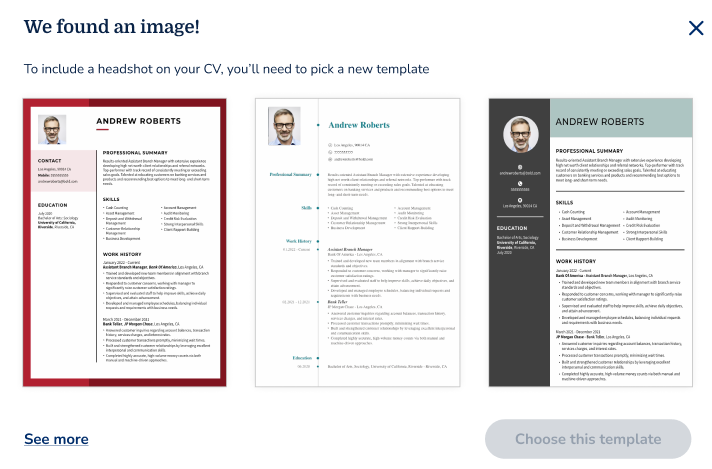
If a user selects a template that does not support photos, the builder now responds intelligently.
- The parsed photo appears in a locked state to show that a headshot was detected.
- Suggested templates are displayed immediately after the upload process.
- Users can preview multiple photo-friendly layouts before switching.
Improved mobile experience
The feature has been fully optimised for mobile users.
- Mobile prompts have been redesigned for smaller screens.
- Users can browse and select compatible templates directly from the recommendation modal.
- The mobile flow mirrors the desktop experience while remaining simple and easy to navigate.
Designed to reduce friction
Many users upload CVs that already include professional profile photos. Previously, those images could be lost if the selected template did not support headshots. This update helps users:
- Preserve more of their original CV design
- Discover better-fitting templates faster
- Reduce manual editing after upload
- Create more polished CVs with less effort