How to Optimise Your Resume for AI and ATS
Beat the bots and land more interviews. Master our AI-friendly resume guide to build a high-scoring application that clears automated screenings every time.

Our customers have been hired by : *Foot Note
You spend time shaping your resume so it reflects your experience, your personality, and the role you want next. You hit submit, feeling confident… and then nothing. Or worse—you get an automated rejection within minutes.
It feels personal, but often it isn’t. Many companies use AI screening tools and ATS software to filter applications long before a recruiter reads them. These systems scan your CV in seconds, searching for relevant information. If the contents don’t match what they expect, even strong candidates can be auto-rejected.
The good news is that you can prevent this from happening. Creating an AI-friendly resume doesn’t mean making it plain or stripping away your style. It simply means presenting your experience in a format that software understands.
In this guide, you will learn:
- What AI scanners and ATS tools actually do.
- How to make a CV that’s well-formatted and easy for software to read.
- How to use job-specific keywords effectively.
- Techniques for writing achievements that work for AI.
- Common CV mistakes that trigger AI screening filters.
Smarter writing with built-in AI
Get instant, high-quality text suggestions tailored to your specific industry.
What AI scanners and ATS actually do
Before you can optimise your resume for AI, it helps to understand what happens the moment you apply. Most employers now rely on a mix of Applicant Tracking Systems (ATS) and newer AI-powered screening tools to handle the sheer volume of applications they receive.
These systems don’t judge personality, potential, or ambition — they simply scan CVs for structure, clarity, and relevance. Once you know what they’re looking for, it becomes much easier to make your application stand out and pass these checks.
What’s the difference between an AI resume scanner and ATS?
ATS (Applicant Tracking Systems)
ATS tools have been used for years. Their job is primarily organisational. They can:
- Store and sort incoming applications
- Pull out key fields like job titles, dates and skills
- Match your resume to the job description using keyword rules
- Assign a basic relevance score
Older ATS systems are strict. If they don’t find familiar headings or clear keywords, your CV may not be passed on.
AI resume scanners
AI CV scanners are more advanced. They can:
- Understand context, not just exact keyword matches
- Recognise patterns like career progression and achievement
- Compare your experience to that of successful candidates in similar roles
- Spot vague, generic, or obviously AI-generated text
- Score your resume based on relevance and quality
The key difference between the two technologies is that traditional ATS tools rely on strict keyword matching, while modern AI scanners can understand context. So instead of needing the exact phrase “project management”, an AI system can recognise the skill through statements like “led cross-functional teams” or “delivered multi-stage projects”.
Why employers use AI and ATS
It isn’t always obvious what happens after you submit your CV, but recruiters often receive hundreds of applications for one role. AI and ATS tools help them manage this volume, allowing them to focus their time on the strongest matches.
Employers use AI and ATS to:
- Process large volumes of resumes quickly
- Identify candidates with the closest match to the job
- Apply consistent screening criteria
- Reduce accidental bias in early-stage reviews
- Save time so they can focus on interviewing stronger candidates
The critical thing to remember is this: AI isn’t judging your worth — it’s checking your CV’s structure. It’s looking for clean formatting, clear headings, recognisable skills, and evidence that you meet the role requirements.
What an AI-friendly CV looks like in 2026
AI screening doesn’t mean you need a plain or generic-looking CV. The systems used today simply look for a clear structure, predictable formatting, and well-written content that matches the role. When those elements are in place, your resume is far more likely to reach a human recruiter.
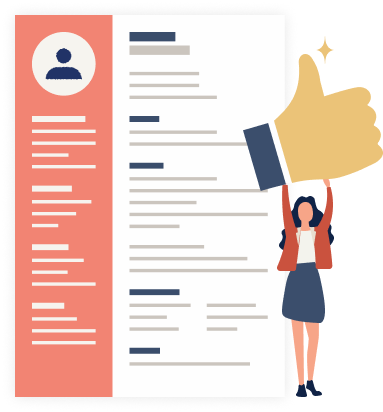
An AI-friendly resume in 2026 follows three core principles:
1. Clear, conventional structure and headings
AI tools scan your resume section by section, so familiar headings help them understand the layout instantly. Use standard titles such as
- CV Summary
- Work Experience
- Skills
- Education
Avoid unusual labels like “Career Journey” or “What I Bring”, as software may not recognise them.
2. Consistent, readable formatting
AI scanners read text, not design elements. They work best with layouts that are:
- Easy to follow
- Free from text boxes, graphics, or embedded icons
- Consistent in font style, size, and spacing
- Organised into simple paragraphs or bullet points
You don’t need a plain, monochrome resume — but your formatting must stay logical. Thoughtful use of colour and clean modern fonts is absolutely fine, as long as it doesn’t interrupt how the content is read. This is why MyPerfectCV’s modern CV templates use structured layouts that look professional and pass through both ATS and AI tools.
3. Content that is specific, relevant and human
Even the best formatting won’t help if the content itself feels vague. AI-friendly resumes:
- Use keywords from the job description naturally
- Highlight achievements, not just responsibilities
- Include specific skills the employer has asked for
- Keep language concise and free from buzzwords
- Sounds like they were written by a real person, not a generator
Modern AI can detect repetitive patterns, keyword stuffing, or generic writing. Specific examples and measurable results make a CV stronger for both software and human reviewers.
How to optimise your CV or resume for AI (step-by-step)
AI tools look for clarity, correct CV formatting, and relevance. The following steps show you exactly how to make your CV easy for AI software to analyse and impressive for recruiters to read.

Use a reverse-chronological format (best resume format for AI)
For almost every profession, the reverse-chronological format is the safest and most effective choice. It places the most recent work experience at the top of the CV, exactly what both AI and human reviewers look for first.
This format works best because it:
- Highlights recent, relevant achievements
- Makes career progression easy to follow
- Matches the structure that AI systems are trained to read
- Feels familiar to hiring managers
Functional or skills-based CVs can be useful in certain situations, such as when you have limited experience or are changing careers. However, they can confuse screening systems because the job history is harder for ATS to parse. If in doubt, stick to a reverse-chronological format as it is the most widely accepted and easiest for employers and ATS tools to read.
Keep the layout clean and consistent
AI tools don’t “see” your resume the way a human does. They scan the underlying text, so the layout needs to support that process. The goal is to keep formatting simple enough for software to interpret while still looking modern and professional.
Best practices for an AI-friendly CV layout:
- Margins: Use standard margins (around 1 inch) for a clean, balanced look.
- Headings: Stick to conventional labels such as CV Summary, Work Experience, Skills, and Education. Use a larger font size or bold the headings.
- Spacing: Keep spacing consistent; avoid cramped or overly spread-out sections.
- Fonts: Choose clear, readable fonts (no decorative scripts or compressed text).
- Length: Aim for a 2-page CV.
- Colour: Use colour sparingly to highlight structure, not distract from content.
- Avoid: Text boxes, columns with uneven alignment, icons, graphics and logos.
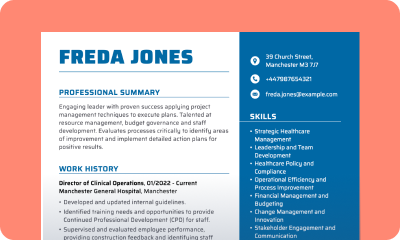
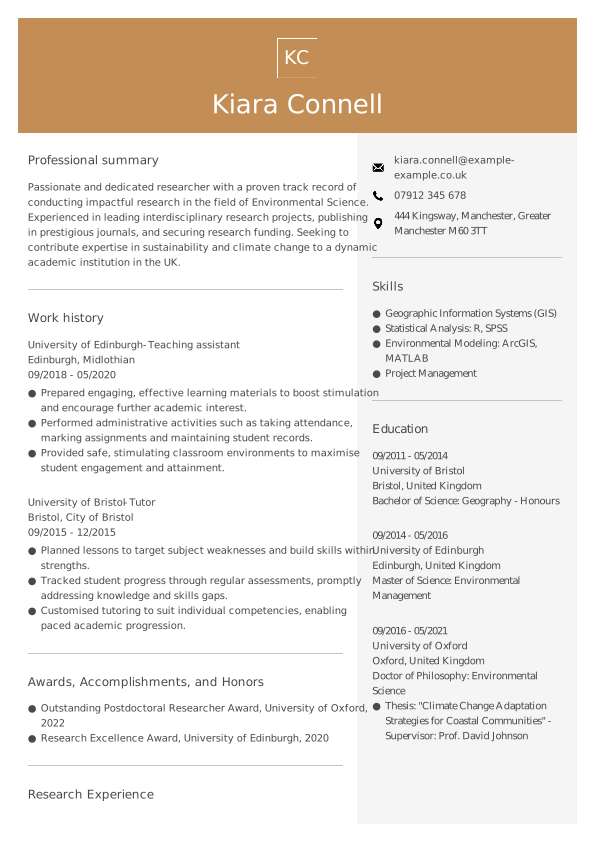
AI-friendly CV example with correct formatting
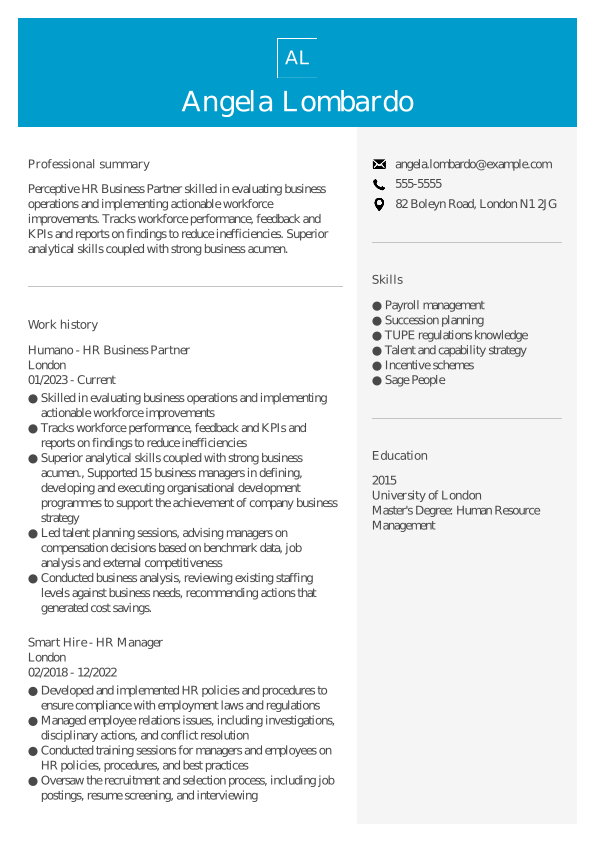
For more AI-friendly CVs, check out our other CV templates.
Save the CV in a format that AI can read
Most AI scanners read PDF and .docx files comfortably, but always follow the employer’s instructions if a specific file type is requested.
- PDF is best for maintaining layout consistency
- DOCX is preferred by some older ATS tools
- Avoid formats like RTF, ODT, or scanned PDFs, as they may break parsing
A good rule of thumb: if the text can be highlighted and copied, AI can read it.
Use keywords the smart way (not just stuffing)
AI screening tools compare your resume to the job description to determine whether your skills and experience align with the employer’s requirements. Keywords matter, but not in the “copy-and-paste everything” way older advice suggests. Modern AI looks for meaning, not just repetition.
The goal is simple: use the right keywords, in the right places, in a way that still sounds like you.
How to find the right keywords
Use the job description as your guide. Look for:
- Required skills (e.g. “customer support”, “budget management”)
- Tools and technologies (e.g. Salesforce, Excel, Python)
- Responsibilities (e.g. “managing stakeholders”, “handling enquiries”)
- Industry language (e.g. “compliance”, “due diligence”, “campaign optimisation”)
These terms show what the employer values, and AI tools expect to see them reflected in your resume.
Where to place keywords for maximum impact
- CV summary: Include two or three keywords that reflect your strongest, most relevant skills.
- Experience section: Use keywords within your achievements, not as lists on their own. This helps AI understand context and shows a human reviewer real evidence of your abilities.
- Skills section: List core skills clearly and match the employer’s preferred phrasing where appropriate.
Good vs ineffective keyword usage
Good example:
“Led a cross-functional team to deliver a £500k project, improving customer retention by 12%.”
(Shows leadership, project management and impact.)
Poor example:
“Project management, team leadership, problem solving, strategy.”
(No context, no results — AI and humans both ignore this.)
Tailor your CV to each job description
AI screening systems are designed to spot relevance. If your resume looks too generic or doesn’t reflect what the employer expects, it may be filtered out before anyone reads it. Tailoring your resume doesn’t mean rewriting everything — it simply means highlighting the parts of your experience that matter most for this role. Think of it as making your strengths easier to recognise. Here’s how to tailor your resume effectively:
1. Study the job description carefully
Look for patterns:
- What skills are mentioned more than once?
- What responsibilities seem most important?
- What tools or qualifications are essential?
These clues show what the employer prioritises, and therefore what AI will scan for.
2. Adjust your CV summary to match the role
Your summary is the first thing both AI and recruiters see, so make it clear that you fit the role. Highlight 2–3 key skills or achievements that directly connect to the job.
Example:
If the job emphasises stakeholder communication and project delivery, your summary might reflect:
“Project coordinator with experience leading cross-functional teams and managing client communication across complex, multi-phase projects.”
3. Reorder your bullet points for maximum relevance
You don’t need to rewrite your entire job history — just ensure the most relevant points appear first.
For example:
If the role focuses on data analysis but your current resume lists admin tasks first, reverse the order:
- Good: “Analysed weekly performance data to identify trends and support decision making.”
- Less effective: “Managed team inboxes, scheduled meetings and maintained documentation.”
Put what matters most at the top.
4. Remove or shorten unrelated experience
If a job isn’t relevant to the role you’re applying for, keep it brief or remove it entirely. AI and recruiters are looking for alignment, not everything you’ve ever done. This is especially helpful for those with a mix of part-time, freelance, or early-career roles.
5. Match terminology when appropriate
If the job description says “client support” and your resume says “customer service”, you can safely match their phrasing (as long as it accurately reflects your experience). This helps AI make the connection instantly.
Write achievements that AI and humans both understand
AI screening systems and recruiters look for the same thing: clear, specific achievements that show the impact you made in your previous roles. Duties alone aren’t enough. AI tools look for signs of progression, measurable results, and relevant skills, while human reviewers want evidence that you can deliver real outcomes.
The strongest CVs combine both. They use short, focused bullet points that highlight what you achieved — not just what you were responsible for. Here are some tips for writing AI-friendly achievements:
1. Start with an action verb
Begin each bullet with a clear verb that shows what you did. Examples include:
“Led, improved, delivered, increased, reduced, supported, created, managed, developed, implemented.”
This instantly makes the sentence easier to scan.
2. Focus on impact, not tasks
AI tools can recognise the difference between a duty and an achievement. A duty describes the work. An achievement shows the result.
Duty: “Responsible for handling customer enquiries.”
Achievement: “Resolved an average of 40+ customer enquiries per day while maintaining a 95% satisfaction rating.”
Recruiters gravitate toward achievements too.
3. Add numbers whenever possible
Metrics help AI understand scale and help recruiters measure your impact. You can quantify:
- Amounts (e.g. “£200k budget”, “15 clients”)
- Timeframes (e.g. “completed 2 weeks early”)
- Improvements (e.g. “reduced processing time by 20%”)
- Volumes (e.g. “managed 100+ orders per day”)
Even rough estimates are better than none.
4. Keep each bullet short and focused
One achievement per bullet point. One or two lines maximum. 6 to 8 bullets for your most recent roles, fewer for older ones. Short bullets improve readability and reduce the chance of important details being missed by AI or humans.
Before: “Responsible for overseeing social media channels and writing content for campaigns.”
After: “Managed social media campaigns across four platforms, increasing engagement by 28% and supporting product launches with targeted content.”
Before: “Worked on administrative duties, including scheduling and documentation.”
After: “Streamlined scheduling and documentation processes for a 12-person team, reducing meeting prep time by 30%.”
Avoid common AI filtering mistakes
Even strong resumes get rejected when small formatting or wording issues confuse AI screening tools. The good news is that these mistakes are easy to avoid once you know what triggers them. Fixing them can immediately improve your chances of getting through the initial scan.
Here are the most common AI-related pitfalls — and how to avoid them:
1. Overly complex layouts
Text boxes, decorative icons, unusual columns or graphics can break parsing and cause entire sections to be missed. Check our CV examples to see what a good AI-friendly layout should look like.
2. Inconsistent dates or job titles
AI systems track your career progression. If your dates use different formats or your job titles are overly creative (“Office Ninja”, “People Wizard”), the software may not understand them.
Use clear titles (“Office Administrator”, “Marketing Manager”) and a consistent date style, such as January 2022 – March 2024.
3. Walls of text
Large paragraphs make it harder for AI to understand what is most important — and humans will skim straight past them. Use short bullet points when describing work experience, education and skills.
FAQs: Optimising a resume for AI and ATS
What is the best CV format for AI screening?
The reverse-chronological format is the most AI-friendly because it puts your most recent and relevant experience first. It’s also the format that ATS and AI systems are trained to read, making it the safest choice for most roles.
What does an AI-friendly resume look like?
An AI-friendly CV has:
- Clear section headings (CV Summary, Experience, Skills, Education)
- Consistent spacing and simple formatting
- Clean professional fonts
- Keyword-rich content written naturally
- Achievements presented in short bullet points
It isn’t plain or unattractive — it’s simply structured in a way that software can interpret easily.
How do I get my resume past AI or ATS filters?
Focus on three things:
- Structure — use clear headings and reverse chronological format
- Keywords — use terms from the job description naturally
- Clarity — write specific achievements with measurable results
This combination helps AI recognise your strengths and increases your chances of reaching a human reviewer.
What file type should I use for an AI-proof resume?
PDF and .docx are the safest options. PDF keeps the CV layout consistent, while .docx works well for older ATS tools. Avoid scanned PDFs, images, RTF or ODT files — many systems can’t read them properly.
Can AI tell if I used ChatGPT or another AI tool to write my resume?
Many AI scanners can detect generic or repetitive patterns common in AI-generated text. You can still use AI to help you brainstorm ideas, but always personalise your final version with real results, tools, and details from your own experience.
Do I need a plain black-and-white resume for ATS?
No. Modern ATS and AI tools can read simple, polished designs as long as the structure is clear. Subtle colour, modern fonts and clean styling are completely fine and recommended. All MyPerfectCV’s CV templates follow these principles and remain AI-friendly.
Is a two-page CV or resume OK for AI screening?
Yes. In the UK especially, a two-page CV is standard once you have solid experience. AI systems don’t mind the length — they care about clarity. However, keep your most relevant work experience on page one.
What’s the difference between an ATS-friendly resume and an AI-proof resume?
An ATS-friendly resume focuses on structure, headings and keywords. An AI-proof CV goes further by providing clear context, measurable achievements and content that feels genuinely human. AI scanners assess meaning, not just matching words.
Ready to create your AI-friendly CV?
A few small optimisations can significantly improve your resume’s performance in AI screening. Once your layout, keywords and achievements are clear, you’re already ahead of most applicants.
If you’d like support shaping everything into an AI-friendly document, MyPerfectCV AI-powered CV builder combines expert-designed templates with helpful content suggestions, making it easier to create a CV that stands out to both software and recruiters.
Andrew Smith
Senior Content Writer
Meet Andrew Smith – an accomplished English copywriter with a strong background in SEO optimisation. Passionate about producing engaging content, Andrew has written across various fields, including health and fitness, security, travel, and tourism.